Security & Readiness Assessment

The Copilot Readiness Kit

6 security domains. 20 checkpoints. Everything your organisation needs to assess, fix, and prove Copilot readiness before deployment.

$249 $399 Save 37%
Run the Full Scan — Copilot SafeScan
6 Domains 20 Checkpoints Instant Download Instant Download
COPILOT 365 · COPILOT HUB Copilot Readiness Checklist Assessment Framework & Deployment Guide 6 Domains 20 Checks 200+ Orgs © 2026 Copilot 365 · www.copilot-365.com

Six Domains. Twenty Checkpoints.

The same security framework used by Copilot SafeScan — now in a self-assessment kit your team can work through independently.

1. Data Exposure 4 checkpoints

Identify SharePoint sites, files, and OneDrive content that is overshared, externally accessible, or exposed to Copilot without governance.

  • SharePoint risk scan
  • External links & guest sharing
  • OneDrive exposure
  • Copilot exposure risk score

2. Identity & Access 4 checkpoints

Surface MFA gaps, stale admin accounts, guest accounts with excessive access, and missing Conditional Access policies.

  • MFA coverage by user
  • Stale admin detection
  • Guest account audit
  • Conditional Access gaps

3. Compliance 4 checkpoints

Check whether DLP policies, audit logging, sensitivity labels, and retention policies are configured to protect your organisation's data.

  • DLP policy coverage
  • Audit log status
  • Sensitivity label usage
  • Retention policy check

4. Teams Security 4 checkpoints

Assess Teams configuration risks — external access policies, anonymous meetings, sprawl of unused teams, and app governance gaps.

  • External access settings
  • Anonymous meeting policy
  • App governance review
  • Channel & team sprawl

5. Licensing 3 checkpoints

Identify inactive licences, over-provisioned plans, and inefficient SKU combinations — surface real cost-saving opportunities.

  • Unused licence detection
  • Inactive user analysis
  • SKU optimisation flags

6. Copilot Readiness 1 checkpoint

Measure how ready your tenant is for Microsoft 365 Copilot — data hygiene, permissions posture, and governance blockers.

  • Overall Copilot readiness score

All 20 Checkpoints

Work through each domain independently or hand off to the relevant team. The kit includes guidance notes and remediation advice for every checkpoint.

Data Exposure 4 checks
SharePoint risk scan
External links & guest sharing
OneDrive exposure
Copilot exposure risk score
Identity & Access 4 checks
MFA coverage by user
Stale admin detection
Guest account audit
Conditional Access gaps
Compliance 4 checks
DLP policy coverage
Audit log status
Sensitivity label usage
Retention policy check
Teams Security 4 checks
External access settings
Anonymous meeting policy
App governance review
Channel & team sprawl
Licensing 3 checks
Unused licence detection
Inactive user analysis
SKU optimisation flags
Copilot Readiness 1 check
Overall Copilot readiness score
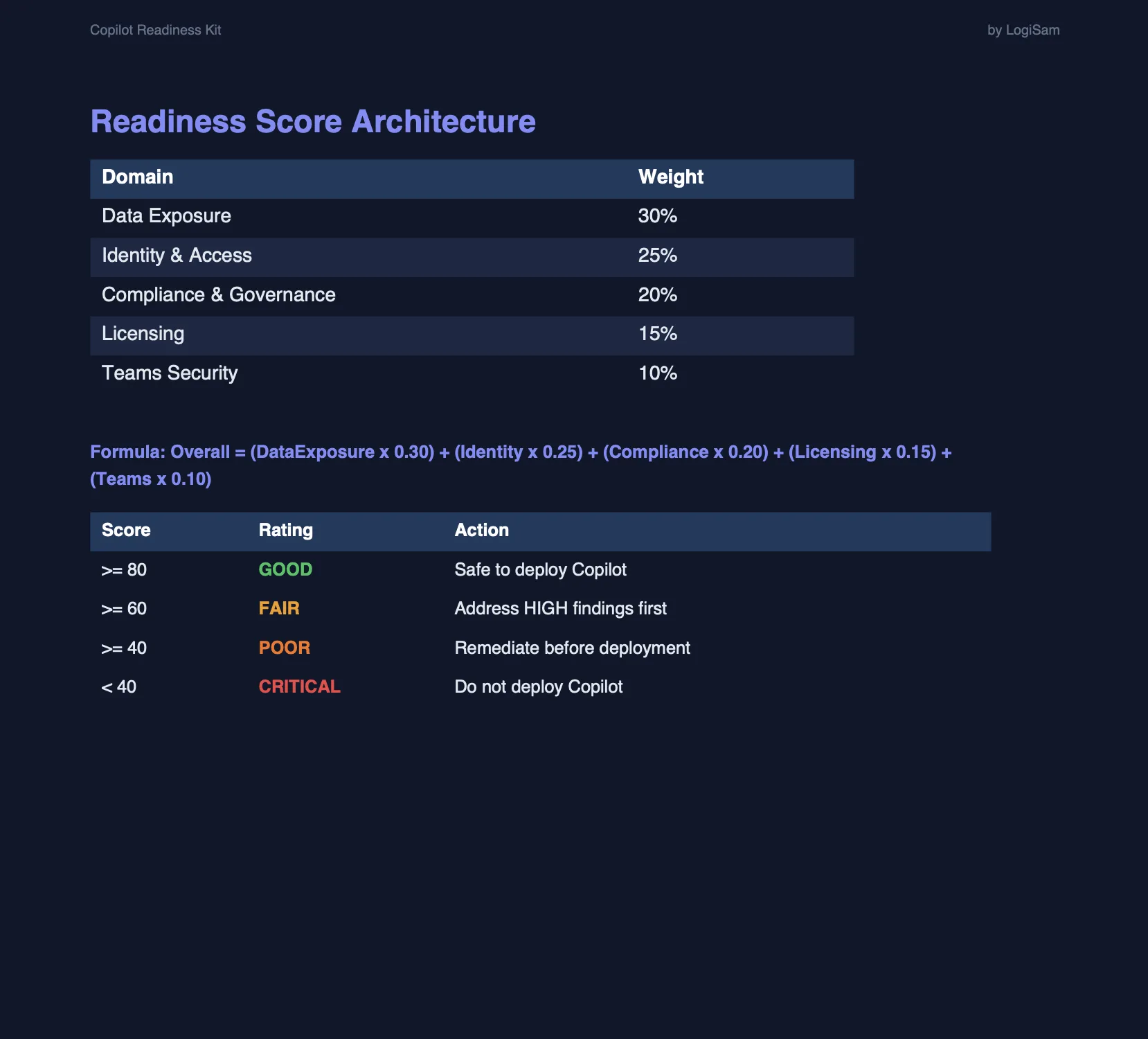
This score aggregates findings across all 5 security domains to give a single readiness rating for your Microsoft 365 tenant.

Includes detailed guidance and remediation steps for every checkpoint · Instant download · USD pricing

Built for the People Leading AI Transformation

IT Directors

Get a clear technical checklist covering infrastructure, security, and Microsoft 365 configuration requirements.

CTOs

Align technology strategy with Copilot capabilities and build the architecture for enterprise-scale deployment.

Transformation Leads

Drive change management, stakeholder buy-in, and adoption with our culture and skills assessment framework.

Microsoft Partners

Use the framework as a structured pre-sales discovery tool and client readiness assessment to accelerate deals.

Three documents. Everything you need.

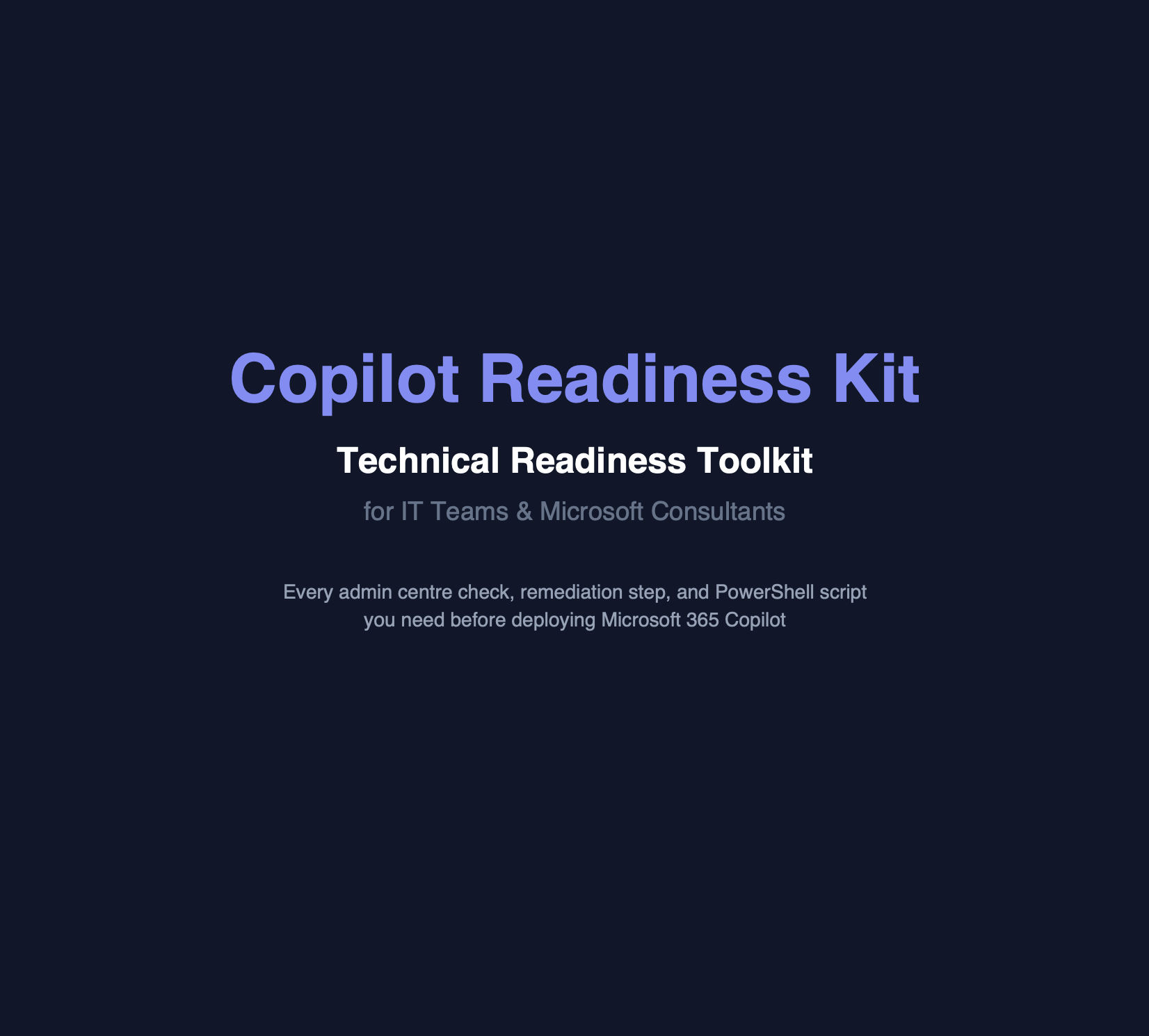
A PDF with full PowerShell scripts, an Excel readiness tracker, and a bonus whitepaper — everything to assess, fix, and document your Microsoft 365 Copilot readiness.
PDF Guide

Security Assessment PDF

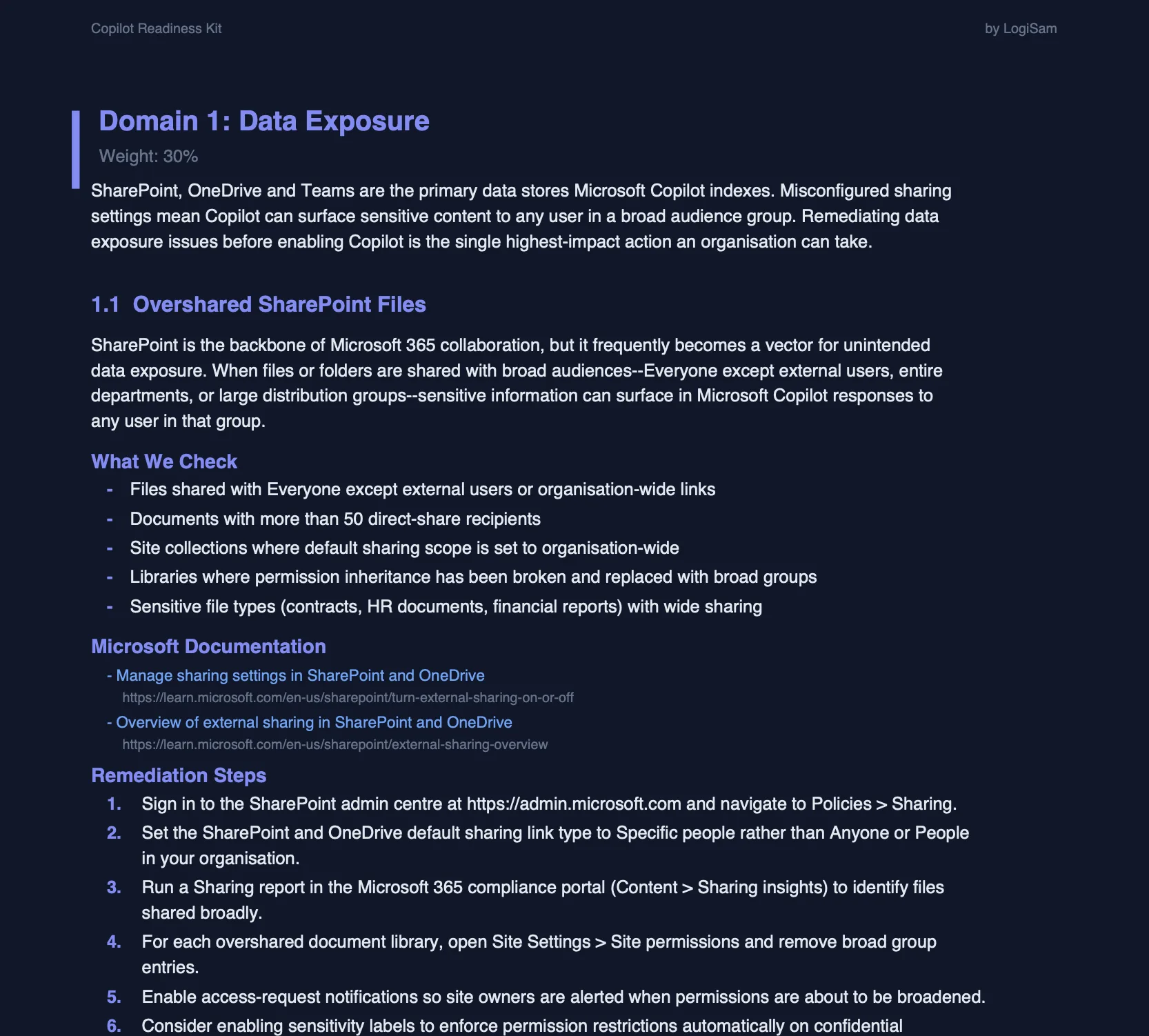
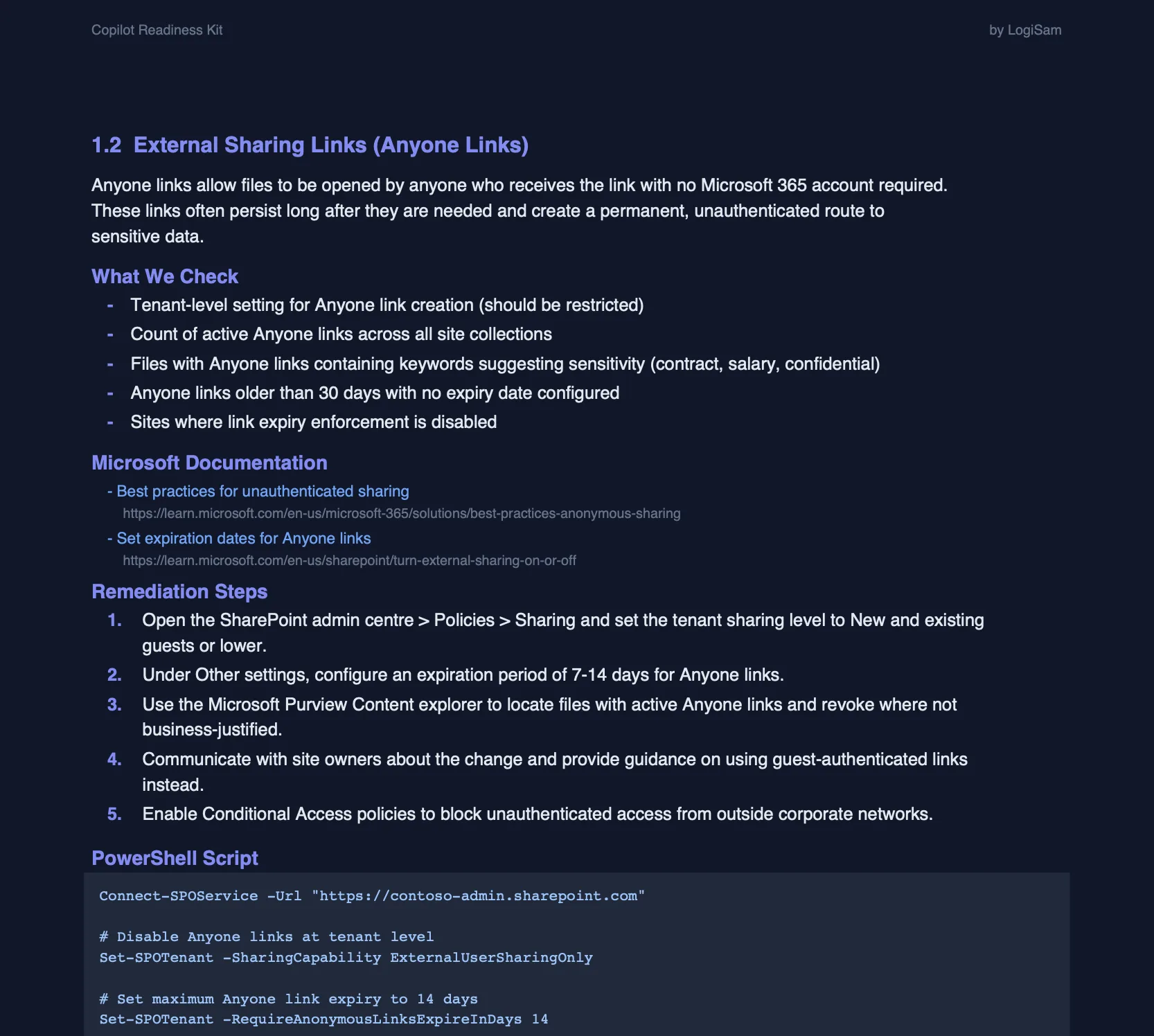
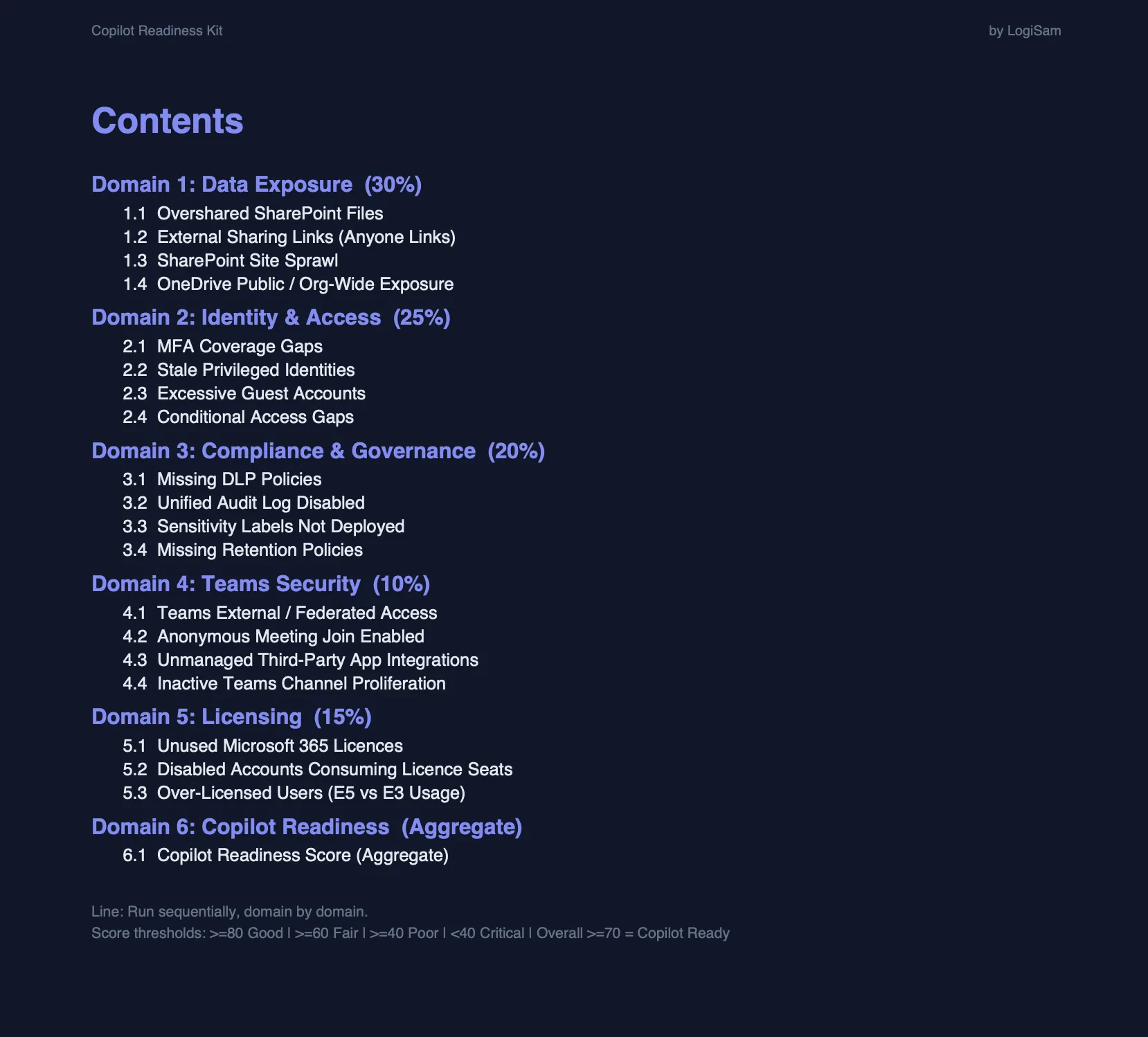
A comprehensive, print-ready PDF covering all 6 domains and all 20 security checkpoints. For every checkpoint you get the recommended UI configuration with step-by-step remediation instructions, plus a complete PowerShell script to automate the check or apply the fix directly in your tenant.

  • All 6 domains & 20 checkpoints
  • Remediation steps from the admin UI
  • Full PowerShell script per checkpoint
  • Print-ready A4 format
  • Hyperlinked sections for easy navigation
  • Domain scoring & priority guidance
Excel Tracker

Readiness Tracker (Excel Workbook)

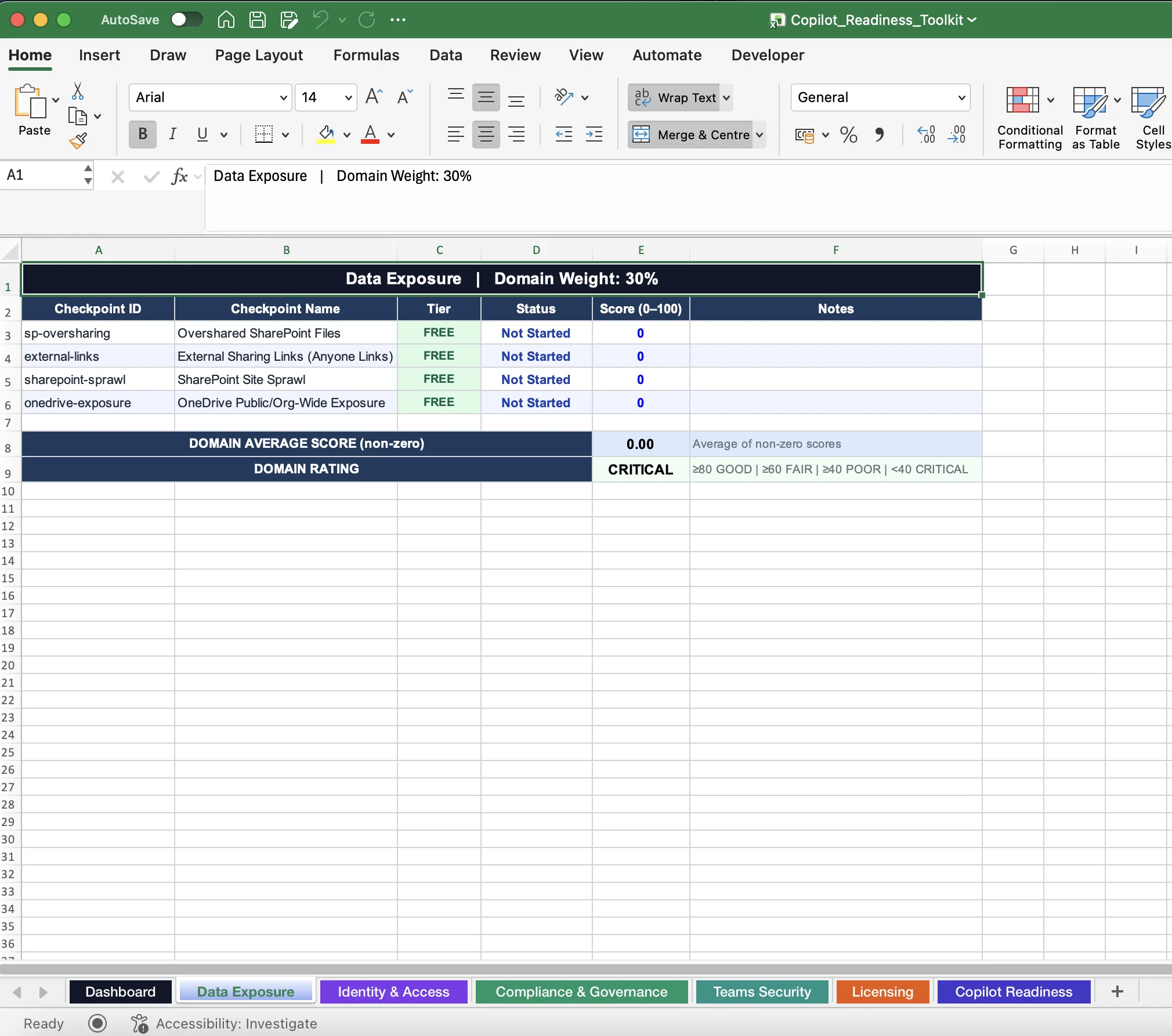
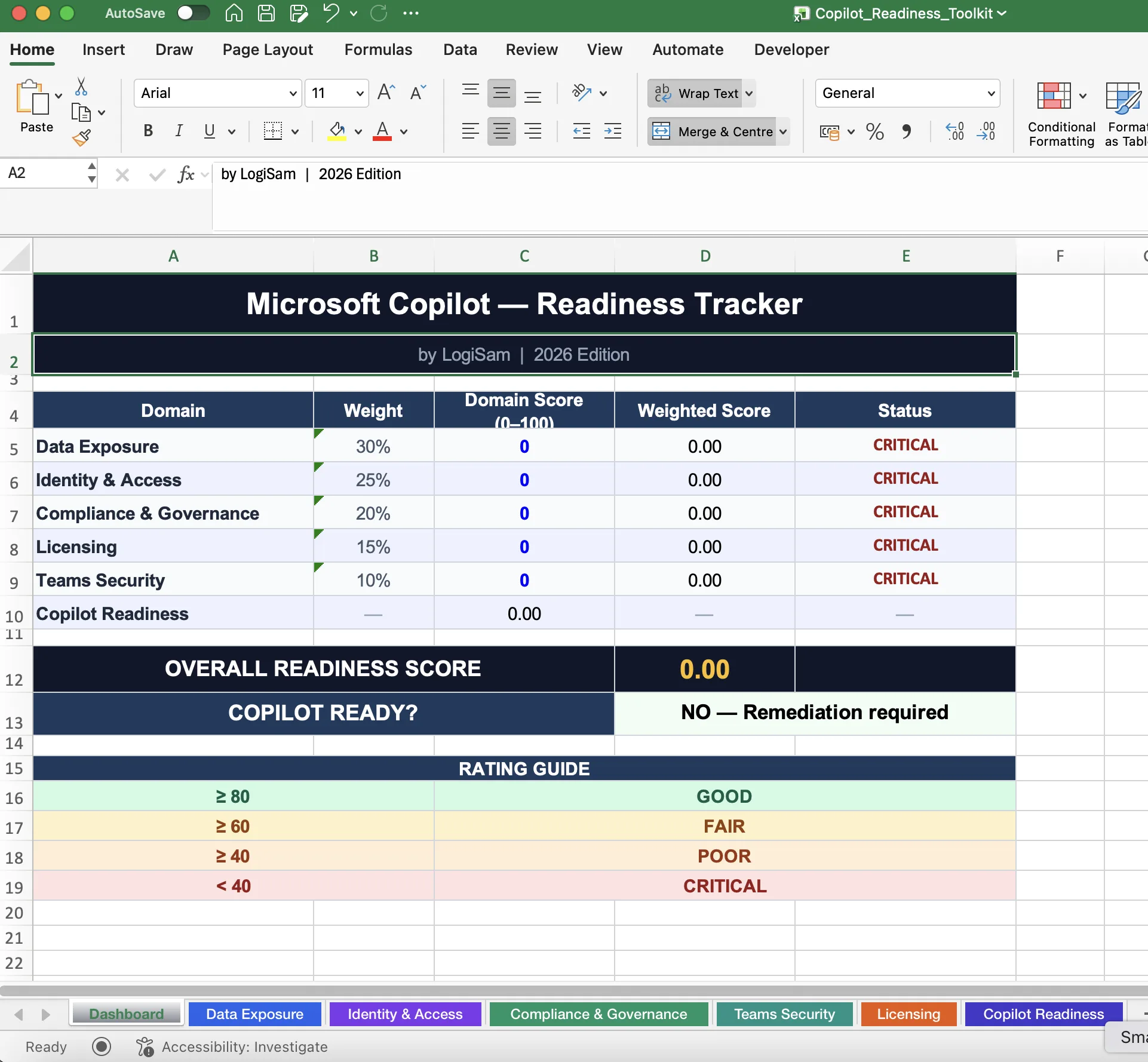
A pre-formatted Excel workbook to track your team's progress against every checkpoint. See at a glance exactly how close you are to being Copilot-ready — with domain-level scores, RAG status columns, owner fields, and an auto-calculated overall readiness percentage.

  • All 20 checkpoints pre-loaded
  • RAG (Red / Amber / Green) status
  • Auto-calculated readiness score
  • Owner & target date fields
  • Summary dashboard tab
  • Filter & sort by domain or status
Bonus Whitepaper

Copilot Licensing & Pre-Rollout Guide

A bonus whitepaper that demystifies Microsoft Copilot licensing — which users need which licences, what prerequisites apply, and the recommended step-by-step process your organisation should follow before rolling Copilot out to the business.

  • Copilot licence models explained
  • User eligibility requirements
  • Recommended pre-rollout checklist
  • Governance & policy considerations
  • User communication template included
  • Arabic & English versions included

Trusted by Transformation Leaders

"The framework is thorough without being overwhelming. We completed the assessment in one day and immediately knew where to focus our efforts."

Digital Transformation Manager

Professional Services Firm, 800 employees

"As a Microsoft Partner, we use the Readiness Checklist in every pre-sales conversation now. It instantly elevates our credibility with prospects."

Head of Modern Workplace Practice

UK Microsoft Gold Partner

"The security and compliance pillar alone was worth the price. It flagged three gaps in our DLP policies we hadn't spotted. Essential reading for any IT Director."

IT Director

UK Housing Association, 1,200 users

Questions About the Checklist

What format is the PDF delivered in?
The guide is delivered as a high-resolution, print-ready PDF. It is formatted for both digital reading (with hyperlinked sections) and A4 printing. You can annotate it digitally or print it for workshop use.
Is this suitable for organisations new to Microsoft 365?
Yes — the guide includes a baseline assessment that covers organisations at all stages of M365 maturity. Whether you are just starting out or already using Teams and SharePoint heavily, the checklist will surface relevant gaps and next steps.
How is the Online Tracker different from the PDF?
The Online Tracker is a web-based platform where your team can check off items, assign owners, add notes, track progress with a real-time dashboard, and generate shareable readiness reports. It is collaborative by design — up to 10 users can access the same workspace simultaneously. The PDF is a standalone document best suited for individual use or printing.
How often is the content updated?
We review and update the Readiness Checklist 2–3 times per year, tracking Microsoft's Copilot roadmap announcements and release notes. All previous buyers receive a free update notification with a new download link. Online Tracker subscribers see updates applied automatically.
Can I use this with my clients as a consultant?
A standard licence covers use within a single organisation. Consultants and Microsoft Partners wishing to use the framework with multiple client organisations should enquire about our Partner Licence, which provides multi-client access at a discounted rate. Email hello@copilot-365.com for details.
Is there a team or enterprise pricing option?
Yes — for organisations requiring more than 10 users on the Online Tracker, or wanting a site licence for the PDF, please contact us. We offer volume discounts for teams of 25+ and custom pricing for enterprise deployments.

Assess Your Copilot Readiness Today

Start with the self-assessment kit, or let SafeScan scan your live Microsoft 365 tenant automatically — and get results in minutes.

Run the Full Scan — Copilot SafeScan

Instant download · USD pricing